
COCO Dataset
Evo jednostavne vežbe Jupiter Notebook za učenike koji koriste skup podataka COCO (Common Objects in Context). Ova vežba će im pomoći da se upoznaju sa učitavanjem i vizualizacijom slika i napomena iz skupa podataka.
Vežba: Istraživanje COCO skupa podataka
Cilj:
Učitajte COCO skup podataka.
Vizualizujte slike i njihove odgovarajuće napomene.
Preduslovi:
Instalirajte biblioteku picocotools.
Preuzmite COCO skup podataka (npr. 2017 Train / Val slike i napomene).
Korak 1: Instalirajte potrebne biblioteke
Prvo, proverite da li imate instalirane potrebne biblioteke. Možete ih instalirati pomoću pip ako već niste:
%pip install pycocotoolsKorak 2: Uvoz biblioteka
import numpy as np
import matplotlib.pyplot as plt
from pycocotools.coco import COCO
import requests
from PIL import Image
from io import BytesIO
Korak 3: Učitajte COCO Dataset
import os

# Path to the COCO annotations file
annFile_url = 'https://github.com/AIForVet/aiml/raw/refs/heads/main/annotations/instances_train2017.json'
annFile_local = 'instances_train2017.json'

# Download the annotations file if it does not exist
if not os.path.exists(annFile_local):
	response = requests.get(annFile_url)
	with open(annFile_local, 'wb') as f:
		f.write(response.content)

# Initialize COCO api for instance annotations
coco = COCO(annFile_local)
Korak 4: Učitajte i prikažite slučajnu sliku
# Get image ids
imgIds = coco.getImgIds()

# Select a random image
img = coco.loadImgs(imgIds[np.random.randint(0, len(imgIds))])[0]

# Load and display the image
img_url = img['coco_url']
response = requests.get(img_url)
img_data = Image.open(BytesIO(response.content))
plt.imshow(img_data)
plt.axis('off')
plt.show()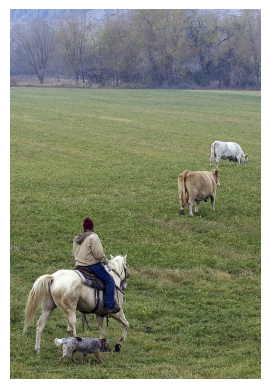
Korak 5: Učitajte i prikažite napomene
# Load and display annotations
annIds = coco.getAnnIds(imgIds=img['id'], iscrowd=False)
anns = coco.loadAnns(annIds)

# Display annotations
plt.imshow(img_data)
plt.axis('off')
coco.showAnns(anns)
# display text for annotations
for ann in anns:
    bbox = ann['bbox']
    plt.text(bbox[0], bbox[1], coco.loadCats(ann['category_id'])[0]['name'], color='red', fontsize=12, weight='bold')
plt.show()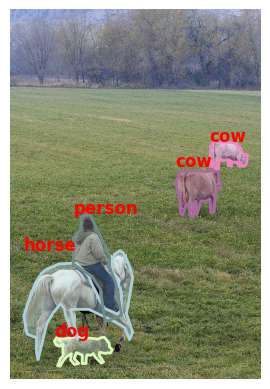
Uputstvo za studente
1. Pratite korake da biste instalirali potrebne biblioteke i učitali COCO skup podataka.
2. Izmenite kod da biste prikazali više slika i njihove napomene.
3. Istražite različite kategorije i vizualizujte slike koje pripadaju određenim kategorijama.
Completion requirements:
- Make a submission