Completion requirements:
- View
Introduction
The digital transformation of education is gaining new momentum with the introduction of Artificial Intelligence (AI) in the classroom. Among the many contributions of AI to education, one of the most notable is its potential to foster interactive activities that enhance student engagement, personalise learning, and improve pedagogical effectiveness. In this chapter, we explore how teachers can use AI tools to create interactive, motivating, and learner-centred activities, transforming the classroom into a more participatory and student-focused environment.
The Interactive Potential of AI
Interactive activities involving AI go far beyond the mere use of screens or cutting-edge technology. True interactivity happens when the student is no longer a passive recipient of knowledge, but actively engages with the content, with peers, and with the teacher. AI enhances this capability through algorithms that respond to students' actions, providing personalised feedback, suggestions, appropriately levelled challenges, and opportunities for collaboration.
Well-integrated AI tools enable educational experiences in which students can:
● Solve problems in real time with immediate feedback.
● Engage in conversations with virtual assistants on curriculum topics.
● Explore content through games, simulations, or adaptive storytelling.
● Learn collaboratively based on analysis of their performance.
Types of Interactive Activities with AI
1. Adaptive Quizzes and Games with Real-Time Feedback
Platforms such as Kahoot, Quizizz, Edpuzzle, and Socrative have begun to incorporate AI mechanisms that adapt content according to students’ performance. AI enables:
● Adjusting the difficulty level of questions.
● Suggesting new topics based on mistakes made.
● Providing personalised explanations after incorrect answers.
These activities can be used to introduce new content, review material, or consolidate learning prior to formal assessments.
Practical example: In a Natural Sciences lesson, the teacher creates a quiz with questions about the respiratory system. The AI detects that some students are struggling with the function of the pulmonary alveoli and presents short videos or simulations on that topic specifically for those students.
Create Kahoot Quizzes Automatically with AI
ChatGPT can generate the questionnaire in a format that Kahoot directly recognizes for the free version.
In the example below, the topic of the questions is indicated directly in the prompt, but you can also send a file (PDF, Word, PowerPoint, etc.) with the study material for ChatGPT to create the questions based on that content.
Step 1- Template prompt (to copy and adapt):
|
I want to create a Kahoot quiz on the topic: Photosynthesis, Rules for the questions: First: Then: |
Step 2 - Generate The Quiz
-
- Paste the prompt into ChatGPT
- Press Enter
- Wait for the table and file to be generated
Step 3 – Download the Excel File
-
- Click on the provided .xlsx file
- Save it to your computer
Step 4 – Import Into Kahoot
-
- Go to kahoot.com
- Log in
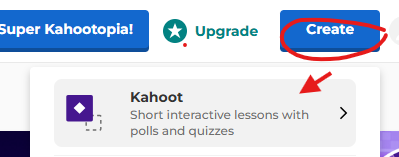
- Click Create - Kahhot
-
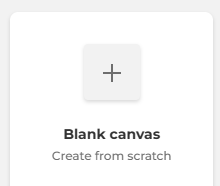
- Choose Blank Canvas
-
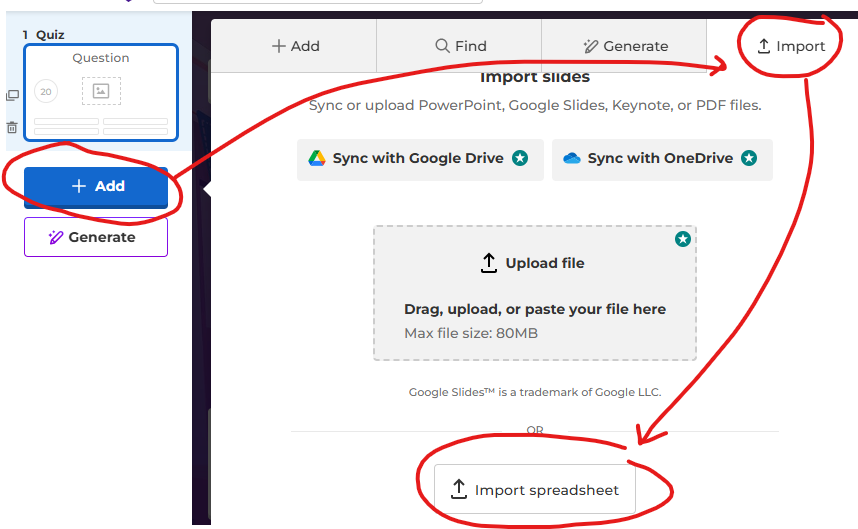
- Select Add - Import - Import Spreadsheet
-
- Select the Excel file - Upload

-
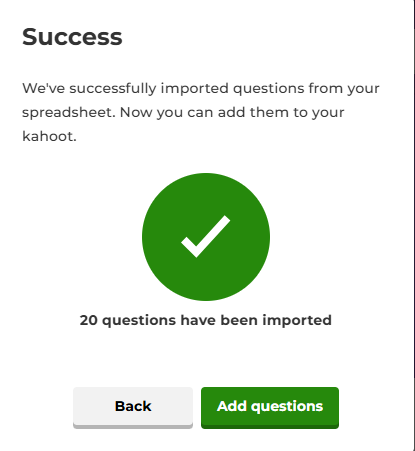
- Select Add questions and Success!
Final Note
Always review the questions and answers before using them with students.
2. Simulations and Virtual Labs with AI
Tools such as Labster, PhET, and PraxiLabs offer virtual or augmented reality simulations, enabling students to carry out scientific experiments in a safe and interactive way. AI monitors students’ actions, suggests corrections, and adapts the challenges according to their progress.
Benefits:
● Eliminates the physical risks associated with experiments.
● Allows activities to be repeated as many times as needed.
● Encourages discovery-based learning.
Practical example: In a Physics lesson, students use a simulation to investigate Ohm’s Law. The AI monitors the values used in the virtual experiments and suggests adjustments to help students better understand the relationship between voltage, current, and resistance.
3. Educational Chatbots and Virtual Assistants
Educational chatbots such as ChatGPT, Khanmigo (from Khan Academy), or customised bots created with Dialogflow or Microsoft Power Virtual Agents, allow students to interact with virtual characters or tutors on curriculum content.
Typical features:
● Step-by-step explanations of complex concepts.
● Immediate answers to questions.
● Suggestions for additional resources or exercises.
Practical example: In Foreign Languages, students interact with a chatbot in English that asks them questions on the topic of “Daily Routines”. The bot corrects grammatical and vocabulary errors, adapting to each student’s level of fluency.
4. Interactive Storytelling with AI
Interactive storytelling is a powerful strategy for engaging students, particularly in primary education. Tools such as Storybird, Twine, or Narrative AI use AI to create branching stories where students’ choices influence the course of the narrative.
Educational objectives:
● Develop critical thinking and creativity.
● Improve written and oral expression.
● Stimulate reading comprehension through dynamic stories.
Practical example: In a History lesson, students choose to represent different characters during the French Revolution and, with the support of AI, make decisions that shape historical events in an interactive way, leading to a deeper understanding of the causes and consequences of each action.
5. Block-Based Programming Activities with AI
Tools such as Scratch, Machine Learning for Kids, or Teachable Machine allow students to programme simple applications, games, or AI models without the need for advanced coding skills.
Educational benefits:
● Promotes computational thinking.
● Develops STEM skills (Science, Technology, Engineering, and Mathematics).
● Encourages problem-solving.
Practical example: Lower secondary students use Teachable Machine to train a model that recognises facial gestures. They then integrate it into an educational game that responds to facial expressions such as smiling or frowning.
Strategies for Implementing AI Activities in the Classroom
To make the most of AI tools, it is important for teachers to adopt a structured pedagogical approach. Here are a few suggestions:
1. Start with Clear Objectives
The use of AI should serve a clear educational purpose. The teacher should define:
● What they want students to learn or practise.
● How AI can support this process.
● How learning will be assessed.
2. Select Accessible Tools
Not all schools have advanced technological infrastructure. Web-based, free tools that are compatible with mobile devices help to promote digital inclusion.
Tip: Create a repository of AI tools tested by the teaching team, with tutorials and suggestions for use by subject area.
3. Ensure Inclusion and Diversity
AI can support inclusion, but it may also create inequalities if not used sensitively. Some measures include:
● Ensuring that all students have access to devices.
● Adapting activities to meet special educational needs.
● Promoting collaboration rather than focusing solely on individual performance.
4. Encourage Co-Creation with Students
Student engagement increases when they are involved in creating their own activities. Teachers can invite students to:
● Create quizzes for their classmates.
● Programme a chatbot to explain a topic.
● Develop an interactive story as a group.
5. Use Formative Assessment
AI can provide a wealth of data on student progress, but the focus should remain on learning, not simply on performance. The teacher can:
● Analyse reports generated by the platforms.
● Use the most common mistakes as a starting point for review.
● Ask students to self-assess their interactive experience.
The use of robots MBOT
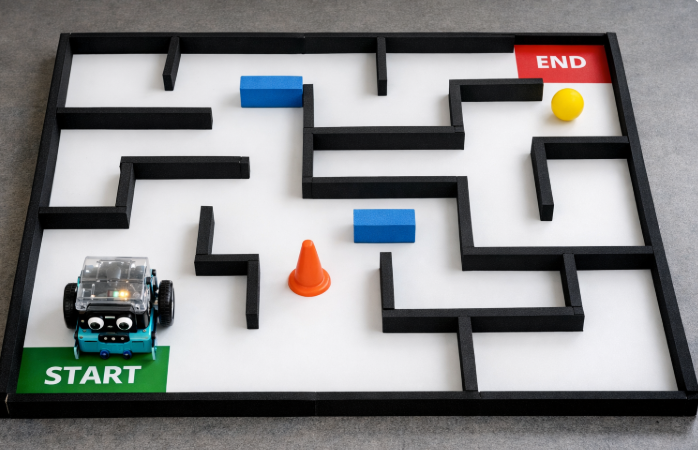
Educational robotics has become a powerful ally in promoting computational thinking, problem-solving and creativity in the classroom. Among the available tools, the mBot robot stands out as an accessible and versatile resource that allows students to engage with programming in a tangible and meaningful way. By combining sensors, motors and visual programming environments, mBot helps learners understand abstract coding concepts through hands-on experimentation, immediate feedback and real-world challenges, making programming more approachable for beginners.
When integrated with digital tools supported by artificial intelligence, mBot can further enrich learning experiences by encouraging adaptive problem-solving, data-driven decision-making and reflective learning processes. Students can design, test and refine programs while interacting with intelligent systems that support debugging, personalization and inquiry. In this way, mBot not only introduces the foundations of programming but also fosters essential 21st-century skills, bridging the gap between coding, robotics and AI-enhanced learning in an engaging and pedagogically meaningful manner.
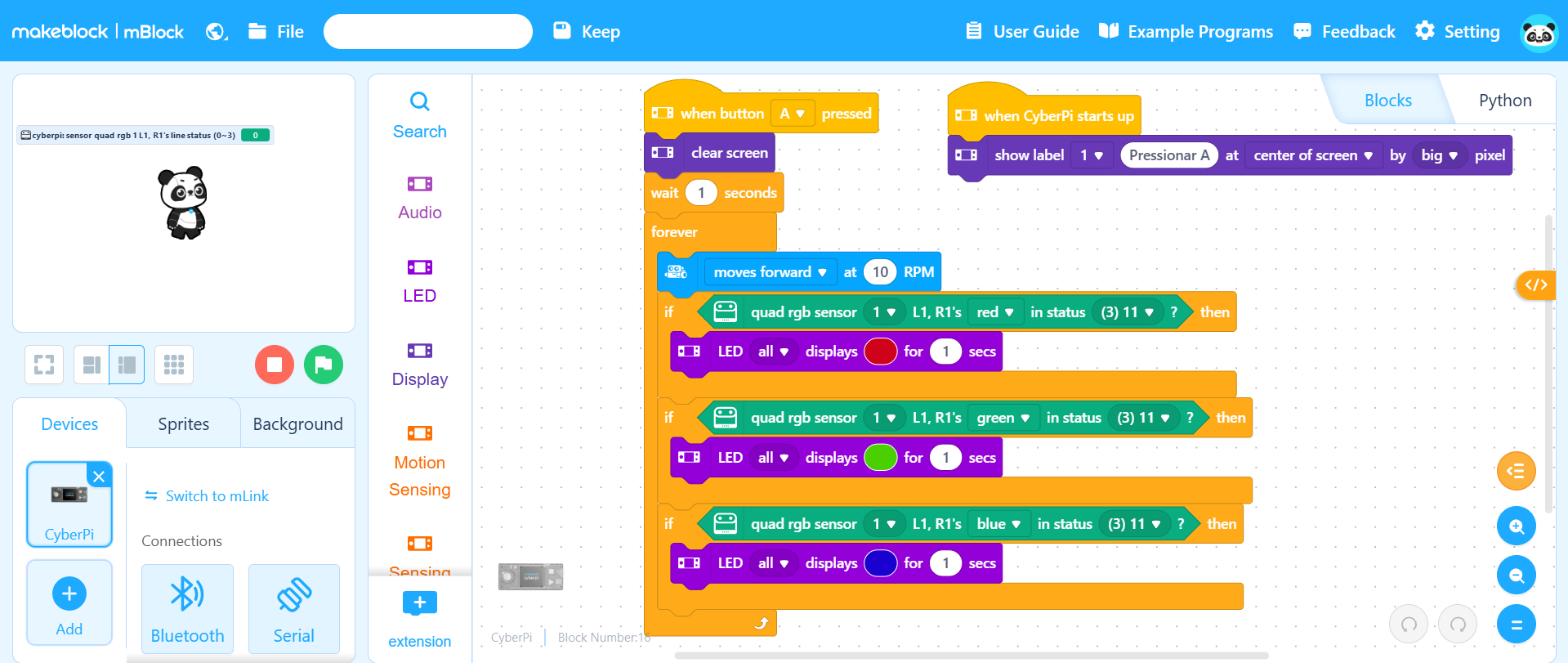
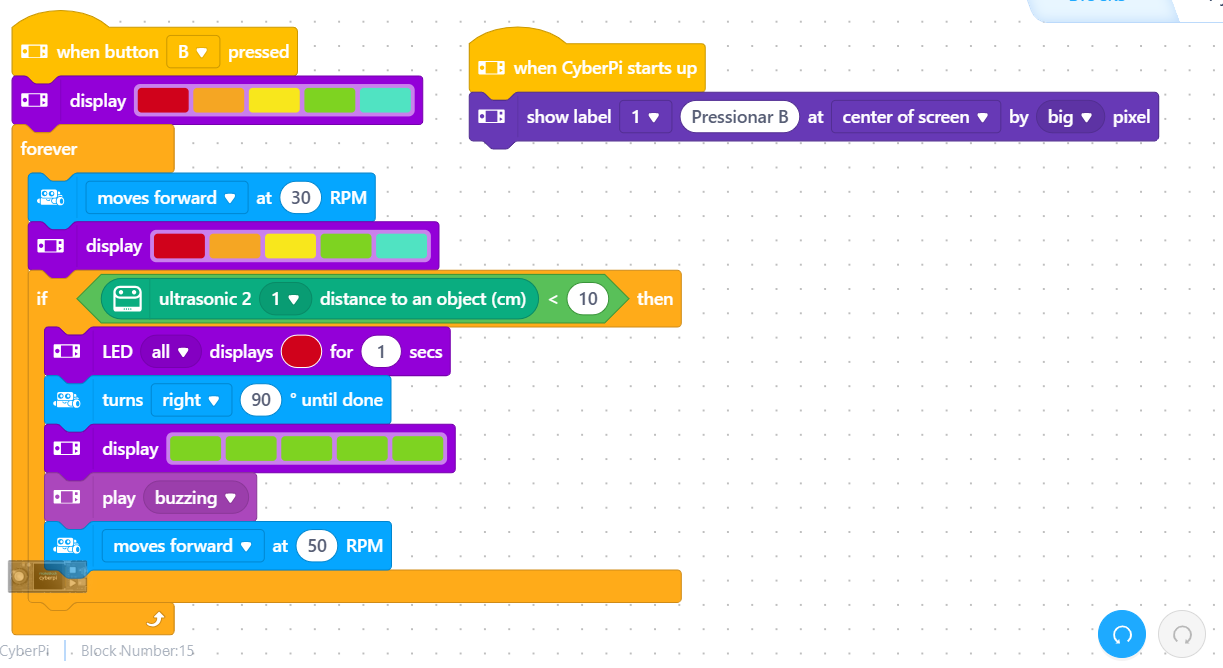
The mBot robot can be programmed using the mBlock web-based platform (https://ide.mblock.cc/), an intuitive environment that allows students to learn programming through visual, block-based coding. By dragging and connecting blocks, learners can control the robot’s movements, sensors and behaviours, making abstract programming concepts such as sequencing, loops and conditionals easier to understand. The platform also supports a gradual transition to text-based coding (such as Python), enabling differentiated learning and progression over time. Using mBlock with mBot helps students develop computational thinking, problem-solving skills and creativity through hands-on, meaningful interaction with technology.
Challenges and Considerations in Using AI for Interactive Activities
Although promising, the use of AI in the classroom requires careful attention to certain risks and limitations:
1. Technological Dependence
There is a risk that students may become overly reliant on automated tools to think or solve problems. The teacher’s role is to ensure a balance between the use of AI and the development of independent thinking.
2. Quality and Reliability of Responses
Some generative AI tools still produce factual errors. Therefore, students should be guided to verify sources and maintain a critical mindset.
Solution: Incorporate digital literacy and critical thinking as an integral part of AI-based activities.
3. Privacy and Data Protection
Many AI tools collect user data. Teachers should:
● Use platforms with clear privacy policies.
● Obtain consent from parents or guardians where necessary.
● Avoid sharing sensitive data.
Success Stories and Best Practices
Case 1: Primary School Using Interactive Storytelling
At a primary school in Portugal, Portuguese and History teachers collaborated on an interactive storytelling project supported by AI. Students created stories based on historical events, with branching narratives, and shared them with other classes. Student engagement increased significantly, along with their understanding of the content.
Case 2: Biology Lesson with Disease Simulation
At a secondary school, a Biology teacher used an AI tool to simulate the progression of infectious diseases in a controlled environment. Students tested variables such as vaccination, social distancing, and mutations. The activity sparked debate and interest, with many students independently researching topics related to epidemiology.
Case 3: Chatbot as a Virtual Maths Tutor
A school cluster used a chatbot developed with Dialogflow to answer lower secondary students’ questions in Mathematics. The bot provided explanations of concepts, guided students through exercises, and suggested videos and summaries. Teachers used the generated reports to adjust their pedagogical strategies.
Final Considerations
Interactive activities with AI represent a golden opportunity to revitalise classroom dynamics, placing students at the centre of the learning process. Far from replacing the teacher, AI serves as a pedagogical partner that enables a greater variety of strategies, adaptive content, and a more engaging and effective educational experience.
To achieve this, it is essential that teachers:
● Are trained in the pedagogical use of AI.
● Experiment with, adapt, and evaluate the tools.
● Share good practices and work collaboratively.
The school of the future will increasingly be a hybrid space, where technology and pedagogy work hand in hand to develop critical, creative citizens who are prepared for the challenges of the 21st century. And the teacher’s role, as a mediator of learning, will be more relevant than ever.
Last modified: Thursday, 18 December 2025, 3:14 PM