20.1 Introduction
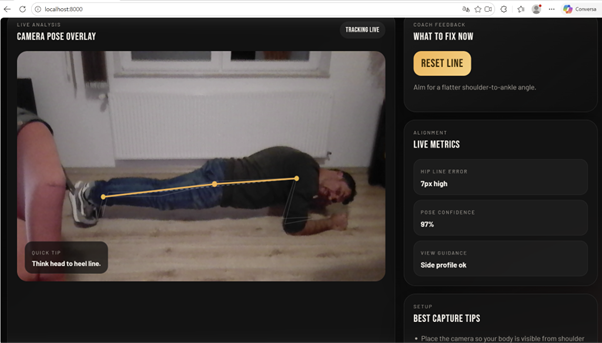
AI Planks is a web application that helps the user to perform the plank exercise correctly.
The plank is a very common physical exercise, but many people do it with poor posture, for example with their hips too low or too high. This application uses the computer's camera to analyze the position of the body and give feedback in real time.
It's a simple example of how AI can be applied to student health, sport, and well-being.
20.2 Objective
The goal of this project is to show students that AI can be used to analyze body movements and support healthy habits.
With this app, students can understand:
-
how the camera can detect the human body;
-
how points such as shoulders, hips and ankles are identified;
-
how to calculate if the body is aligned,
-
how to turn visual data into useful feedback;
-
How to create a fitness support app.
20.3 Technologies used
The application was developed with:
-
HTML5 – application structure;
-
CSS3 – modern and responsive design;
-
JavaScript – analysis and feedback logic;
-
MediaPipe Pose Landmarker – body pose detection;
-
Webcam – capture of the user's image;
-
Browser – running the application without installation.
20.4 How AI is applied
The application uses computer vision to detect points on the human body.
AI identifies points such as:
-
shoulder;
-
hip;
-
ankle;
-
ear.
Then, the app analyzes the body line and calculates whether the hip is aligned with the shoulders and ankles.
If your hips are too low, the app gives the "Raise hips" warning. If they are too high, it indicates "Lower hips". If the posture is correct, it shows a positive message, such as "Strong line".
20.5 How it was built
The application contains three main files:
-
index.html – visual structure of the application;
-
styles.css – presentation, colors and organization;
-
script.js – pose detection, posture analysis and feedback.
The code uses the pose_landmarker_lite template, loaded through the MediaPipe Tasks Vision library. The analysis is done directly in the browser, using the image captured by the camera.
The Claude tool was used as a support in the development, namely to structure the code, improve the interface, write feedback messages and organize the documentation.
20.6 How to use the app
-
Open the app in your browser.
-
Click on "Start Camera Analysis".
-
Allow access to the camera.
-
Place the body sideways in relation to the camera.
-
Make sure shoulders, hips and ankles appear in the frame.
-
Do the plank position.
-
Observe the feedback presented by the application.
-
Correct posture according to the indications:
-
raise the hips;
-
lower the hips;
-
aligning the body;
-
Keep the neck neutral.
20.7 Accessing the App
Source code:
20.8 Suggestions for use in the classroom
This application can be used in ICT disciplines, programming, physical education, health or interdisciplinary projects.
Students can:
-
test the application in different positions;
-
observe how AI detects the human body,
-
discuss the limits of computer vision;
-
improve the interface;
-
translate the messages into Portuguese;
-
add training timer;
-
create evolution statistics;
-
adapt the app to other physical exercises.
Last modified: Friday, 26 June 2026, 6:10 AM