18.1 Introduction
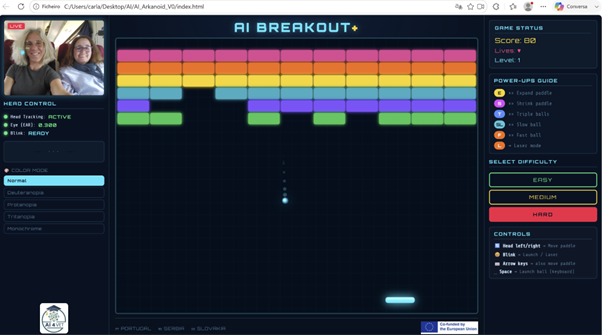
AI Breakout+ is an accessible version of the classic Arkanoid/Breakout game. In this game, the player controls a paddle to stop the ball from falling and to make it hit the blocks, destroying them on the screen.
The main difference is that this version can be controlled via the computer's camera. Instead of using only the keyboard, the player can move the racket with the movement of the head and throw the ball or shoot through the blink.
This application demonstrates how Artificial Intelligence and computer vision can make games more accessible to people with motor difficulties.
18.2 Objective
The aim of this project is to show that AI can be used to create inclusive solutions. The application allows you to understand, in a practical way, how the camera can detect points on the face and transform this data into commands to control a game.
With this project, we can learn:
-
what is computer vision;
-
how facial recognition by landmarks works;
-
how to transform real movements into digital actions;
-
how to create accessible interfaces;
-
how to adapt games for different users.
18.3 Technologies used
The application has been developed with simple web technologies:
-
HTML5 – page structure;
-
CSS3 – design, colors, buttons and layout;
-
JavaScript – game logic and control;
-
MediaPipe FaceMesh – detection of the points of the face;
-
Webcam – capture of the user's image;
-
Browser – running the application without installation.
18.4 How AI is applied
The app uses the camera to detect the user's face. The system identifies specific points on the face, such as the position of the nose and eyes.
The horizontal position of the nose is used to move the racket to the left or right. When the user blinks, the system interprets that movement as an action, for example throwing the ball, firing or restarting the game.
In this way, AI makes it possible to transform natural body movements into digital commands.
18.5 How it was built
The application was built with three main files:
-
index.html – contains the structure of the page and the main elements of the game;
-
style.css – defines the visual aspect of the application;
-
game.js – contains game logic, face detection, and motion control.
During development, prompts were used in generative AI tools to support the organization of the code, improve the graphical interface, create technical explanations, and test different forms of control.
18.6 How to use the app
-
Open the app in your browser.
-
Allow access to the camera when prompted.
-
Sit in front of the computer, with your face clearly visible.
-
Wait for the system to detect the face.
-
Move your head left or right to control the racket.
-
Blink to throw the ball or perform actions.
-
Try to destroy all the blocks and advance through the level.
18.7 Accessing the App
Source Code:
Last modified: Friday, 26 June 2026, 6:08 AM