12. PROJECT: Automated Waste Classification and Sorting System using Dobot Magician
Dobot Blockly is a programming platform based on Google Blockly. In this process, users can program through the puzzle format, which is straightforward and easy to understand. Also, users can use the integrated API of Dobot anytime.
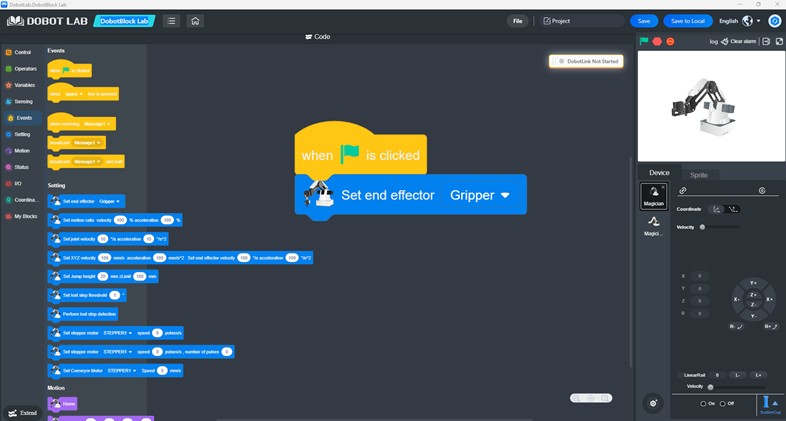
12.1 Blockly Interface
Open DobotStudio and click DobotBlock Lab:
12.2 Block code
12.3 Problem Initialization and Definition
Context and Motivation
In modern industry and ecology, manual waste sorting is a slow, inefficient, and often hazardous process. The goal of this project is to create an autonomous system that utilizes Computer Vision and robotic manipulation to recognize and physically separate different materials (in this case, organic waste and plastic).
Problem Statement
The primary challenge lies in the synchronization of three independent subsystems:
1. Transport System: A conveyor belt that brings objects into the workspace.
2. Sensing System: A camera that must identify the item type in real-time.
3. Actuation System: A robotic arm that must precisely execute picking and placing based on sensor feedback.
12.4 Solution Architecture
The solution is based on the Dobot Magician platform and a block-based programming environment (Blockly) that integrates AI modules for image recognition.
Hardware Components
- Dobot Magician Arm: A high-precision 4-axis robot.
- Suction Cup: Used as the end effector for its versatility in handling various shapes.
- USB Camera: Mounted above the belt for a stable top-down view.
- Conveyor Belt: Controlled via a stepper motor connected to the Dobot.
Software Logic
The algorithm follows an iterative closed-loop model: Start Belt -> Stop -> Capture -> Analyze -> Sort -> Return to Home.
12.5 Detailed Code Block Analysis
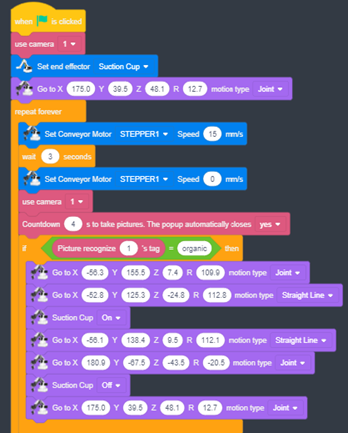
The program is divided into four key segments:
Configuration (Setup)
- use camera 1: Declares the hardware input for visual data.
- Set end effector [Suction Cup]: Soft-maps the air pump control to the robot's output.
- Go to X:175, Y:39.5, Z:48.1: This is the "Safety Position." The robot retreats to avoid obstructing the camera and ensures an optimal path to any point on the belt.
Logistics (Conveyor Control)
Inside the repeat forever block:
- Set Conveyor Motor [STEPPER1] Speed 15 mm/s: Activates the belt at a controlled speed to prevent light objects from sliding.
- wait 3 seconds: A critical time constant defining the distance between items.
- Speed 0: Stops the belt so the robot can perform a precise "static pick".
AI Inspection (Picture Recognition)
- Countdown 4 s: Provides stabilization time for the camera to focus and for the AI popup to process the image.
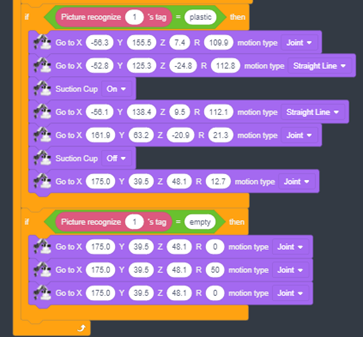
- If Picture recognize 1's tag = [organic/plastic]: Calls the Deep Learning API to compare the current frame against a trained dataset and returns a class tag.
Kinematics and Manipulation
For each branch (organic/plastic), the system uses two motion types:
1. Joint Motion (PTP): Moves all joints simultaneously for the fastest point-to-point travel.
2. Straight Line (Linear): Moves the arm strictly vertically on the Z-axis to ensure the suction cup makes perfect contact without knocking the item over.
12.6 Operational Algorithm (Step-by-Step)
· START: Initialize instruments and set end effector.
· TRANSPORT: Move belt for 3 seconds, then stop.
· SENSE: Capture image and identify tag via AI.
· DECISION:
· If Organic: Move to grab coordinates, turn suction On, move to organic bin, turn suction Off.
· If Plastic: Move to grab coordinates, turn suction On, move to plastic bin, turn suction Off.
· If Empty: Perform a signaling "shake" motion (rotating the R-axis).
· RESET: Return to the initial safety coordinates.
· LOOP: Repeat the cycle indefinitely.
12.7 Technical Coordinate Specifications
Based on the script, the following coordinates have been calibrated:
|
Point |
X (mm) |
Y (mm) |
Z (mm) |
R (°) |
Description |
|
Home |
175.0 |
39.5 |
48.1 |
12.7 |
Idle/Wait position |
|
Approach |
-56.3 |
155.5 |
7.4 |
109.9 |
Position above item |
|
Grab |
-52.8 |
125.3 |
-24.8 |
112.8 |
Contact point (Lowered) |
|
Organic Bin |
180.9 |
-67.5 |
-43.5 |
-20.5 |
Disposal for organics |
|
Plastic Bin |
161.9 |
63.2 |
-20.9 |
21.3 |
Disposal for plastics |
12.8 Implementation Troubleshooting
· Inaccurate Grabbing: Ensure the item is centered. If it varies, use guides on the belt or integrate dynamic X/Y feedback from the AI camera.
· Classification Errors: AI recognition is sensitive to light. Use a high-contrast belt color and consistent external LED lighting.
· Safety: Always ensure the workspace is clear of obstacles before starting the repeat forever loop.
Last modified: Tuesday, 2 June 2026, 2:32 PM