4. Train Data - Create Inference Model
Data location is /home/pi/mycar/data. All tub folders in this directory will be used to create your model. Remove anything you don't want included. You can train data with Raspberry Pi or with AWS virtual machine .
1. Train with Raspberry Pi
Train Data:
In a new terminal session on your host PC use rsync to copy your cars folder from the Raspberry Pi
rsync -rv --progress --partial <hostname>@<your_pi_ip_address>:~/mycar/data/ ~/mycar/data/
etc:
rsync -rv --progress --partial piracer1@192.168.1.111:~/mycar/data/ ~/mycar/data/
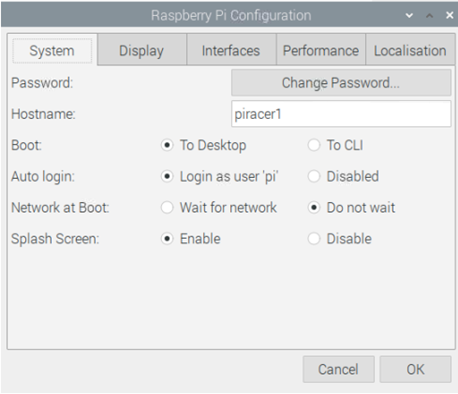
You can find hostname in Raspberry Pi Configuration:
Train model:
In the same terminal you can now run the training script on the latest tub by passing the path to that tub as an argument. You can optionally pass path masks, such as ./data/* or ./data/tub_?_17-08-28 to gather multiple tubs. For example:
python ~/mycar/manage.py train --tub <tub folder names comma separated> --model ./models/mypilot.h5
etc:
python ~/mycar/manage.py train --tub ./data/tub_1_24-04-06 --model ./models/mypilot.h5
It will cost a long time to train a model, please be patient.
After training, you can get a model, you need to copy the module to your raspberry Pi and test it.
rsync -rv --show-progress --partial ~/mycar/models/ <hostname>@<your_ip_address>:~/mycar/models/
etc:
rsync -rv --show-progress --partial ~/mycar/models/ piracer1@192.168.1.111:~/mycar/models/
Last modified: Tuesday, 2 June 2026, 2:27 PM