19.1 Introduction
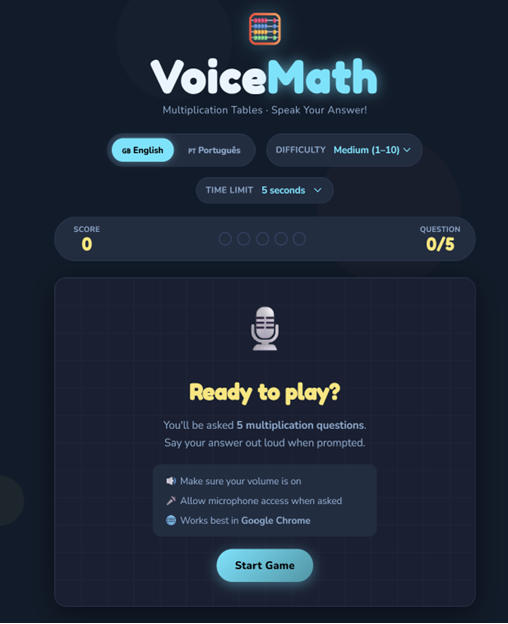
VoiceMath, also known as Math English Game, is an educational application that allows you to practice multiplication tables using your voice.
The student hears a question, for example "seven times eight", and answers orally. The application recognizes the answer spoken by the student and verifies that it is correct.
The app can be used in Portuguese or English, helping students to practice mathematics and, at the same time, number vocabulary in a foreign language.
19.2 Objective
The aim of this project is to create a simple tool to support the learning of multiplication tables and improve students' confidence in oral communication.
The application allows you to work on two areas at the same time:
-
Mathematics, through the practice of multiplication tables;
-
English, through listening and pronunciation of numbers.
It is a useful tool for students in primary education, vocational courses or contexts of learning English as a foreign language.
19.3 Technologies used
The application was developed with:
-
HTML5 – application structure;
-
CSS3 – graphical interface and animations;
-
JavaScript – game logic;
-
Web Speech API – voice recognition and reading of questions;
-
Microphone – capturing the student's response;
-
Chrome browser – recommended for best operation.
19.4 How AI is applied
The app uses voice recognition to interpret what the student says.
When the student responds orally, the browser transforms the speech into text. Then, the application compares this answer with the correct result of the mathematical operation.
The application can also use speech synthesis to read questions aloud. Thus, the student listens to the question, thinks about the answer and answers orally.
This process makes learning more active and interactive.
19.5 How it was built
The app has been organized into three main files:
-
index.html – structure of the application;
-
style.css – design and visual presentation;
-
script.js – game logic, questions, answers, voice recognition, and languages.
The generative AI tool Claude was used as a support to create and improve the code, organize the interface, review the documentation, and test different ways of recognizing answers in Portuguese and English.
19.6 How to use the app
-
Open the app in Google Chrome.
-
Allow access to the microphone.
-
Choose the language: Portuguese or English.
-
Choose the difficulty level.
-
Define whether you want to play with or without a time limit.
-
Click on "Start Game".
-
Listen to the question.
-
Say the answer out loud.
-
Check if the answer was accepted as correct or incorrect.
-
Continue until the end of the game and watch the score.
19.7 Accessing the Application
Source code:
19.8 Suggestions for use in the classroom
This application can be used in math, English, ICT or study support classes.
Students can:
-
practice multiplication tables individually;
-
train the pronunciation of numbers in English;
-
compare answers in Portuguese and English;
-
create new difficulty levels;
-
add other mathematical operations,
-
adapt the app to other languages.
Last modified: Friday, 26 June 2026, 6:09 AM