9. Driver Installation Instruction
When first connecting the Dobot, connect the Dobot to PC through the USB port. Then, power on the Dobot, then the system will recognize the corressponding hardware automatically and will search for the correct driver and install it. However, if it fails to install, you can install it again manually. The installation flow chart as follows:

9.1 Download CH340 driver package and install it
There are two versions of the driver based on Windows/Linux, so please choose the corressponding version to your OS to download. The driver can be located at the download address:
http://www.dobot.cc/downloadcenter.html?sub_cat=70#sub-download
After downloading, unzip and install the driver
9.2 Check if the equipment can work properly in the device manager
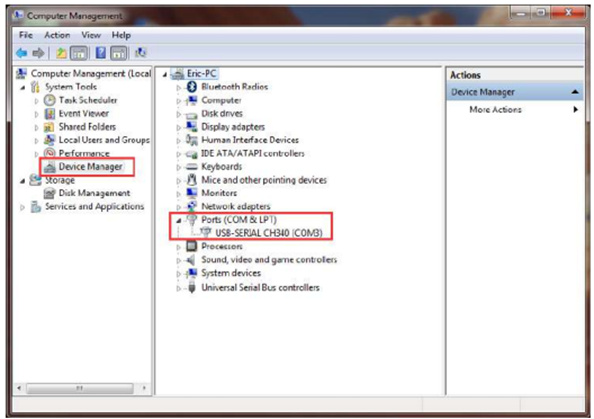
Open the device manager and if you can find the corresponding COM port of “USBSERIAL CH340”, then it shows the driver is installed successfully. The correct installation is shown below:
Last modified: Tuesday, 2 June 2026, 2:31 PM