8. AR + AI Object Detection Demo
8.1 Project Overview
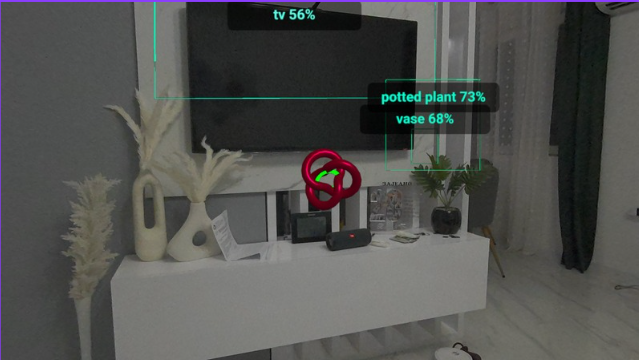
This is a WebXR Augmented Reality application for Meta Quest 3 that combines:
- Passthrough AR — the real room is visible through the headset cameras
- Hit-test interaction — a virtual cursor that snaps to real-world surfaces
- AI object detection — TensorFlow.js recognizes objects in the camera feed and displays labels in 3D space
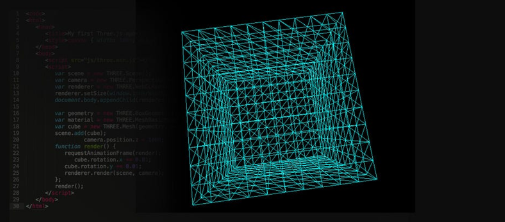
- Scene Understanding — WebXR Plane Detection visualizes detected surfaces (floor, walls, table)
Live URL: http://92.113.18.92/
Single file:
index.html
8.2 Project Architecture
📄 index.html (all-in-one)
│
├── HTML → canvas + UI button + hidden video element
├── CSS → transparent background, overlay UI
└── JavaScript
├── Three.js → 3D rendering engine (scene, camera, materials)
├── WebXR API → AR session, hit-test, plane detection
└── TF.js → AI inference (coco-ssd model)
Why pure Three.js (no A-Frame)?
During development it was discovered that A-Frame has its own internal render loop that conflicts with an explicit immersive-ar WebXR session. A-Frame starts an immersive-vr session (opaque, no passthrough) instead of immersive-ar. Switching to pure Three.js gave us direct control over both the session type and the render loop.
8.3 Technology Stack
|
Technology |
Version |
Role |
|
Three.js |
0.157.0 |
3D rendering, geometry, materials |
|
WebXR Device API |
Browser-native |
AR session, hit-test, plane detection |
|
TensorFlow.js |
4.15.0 |
In-browser ML inference engine |
|
COCO-SSD |
2.2.3 |
Pre-trained object detection model |
|
getUserMedia API |
Browser-native |
Camera stream for TF.js analysis |
8.4 Application Flow
Page loads
→ TF.js model (coco-ssd) loads asynchronously (~6MB)
→ Check: navigator.xr.isSessionSupported('immersive-ar')
→ "Enter AR" button becomes active
User clicks "Enter AR"
→ Request: navigator.xr.requestSession('immersive-ar', {...})
→ Quest enables Passthrough (camera visible through headset)
→ Simultaneously: getUserMedia() → camera stream for TF.js
→ renderer.setAnimationLoop() starts (XR render loop)
Every frame (~72fps on Quest 3)
o scene.background = null (ensures transparency)
o Hit-test → updates cursor position
o Plane Detection → updates surface visualization
o Every 2s → runDetection() → AI inference
o renderer.render(scene, camera)
8.5 Detailed Code Explanation
1. HTML Structure (lines 1–78)

A hidden <video> element receiving the getUserMedia() stream. TensorFlow.js uses it as input for inference — it is never displayed to the user, only analyzed.

An overlay UI layer floating above the Three.js canvas. pointer-events: none on the container but pointer-events: all on the button only — so the overlay doesn't block 3D interactions.
2. Three.js Initialization (lines 84–109)

alpha: true creates a WebGL canvas with a transparent alpha channel — this is a prerequisite for passthrough. xr.enabled = true activates Three.js's built-in WebXR integration.

The camera is added to the scene. This is important because objects attached to the camera (child entities) need to be in the scene hierarchy.
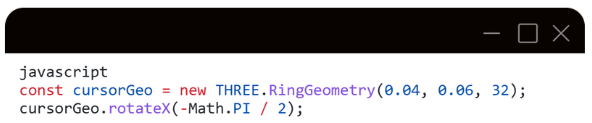
The ring geometry is rotated -90° on the X axis so it lies flat horizontally on detected surfaces. Without this rotation it would stand vertically.
3. makeLabel() — Text Sprite (lines 113–138)
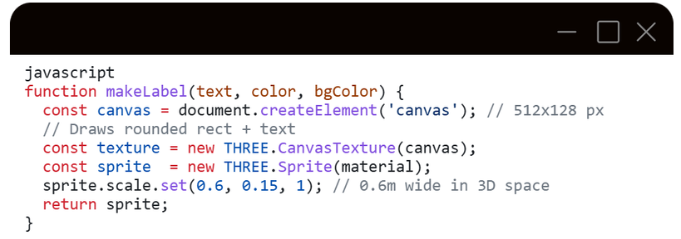
THREE.Sprite is an object that always faces the camera (billboarding) — ideal for labels in 3D space. It is drawn on an HTML canvas, converted to a CanvasTexture, and applied to a SpriteMaterial.
depthTest: false ensures the label is always visible even if it is geometrically "behind" another 3D object.
4. detectionTo3D() — 2D → 3D Projection (lines 140–163)
This is the mathematical core of the AI-AR integration.
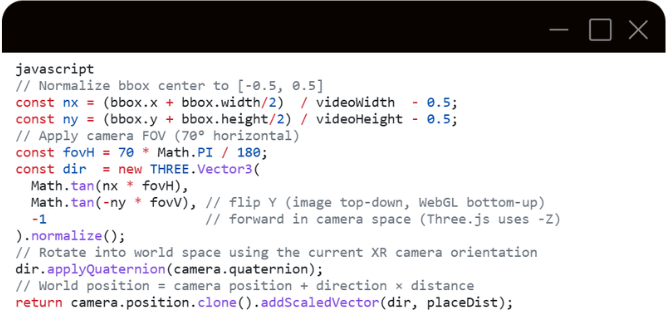
Example: If the AI detects a chair in the left third of the video, nx ≈ -0.17. This converts to a negative angle (left of the gaze axis). The label is placed 1.8m in front of the camera in that direction.
5. makeBox3D() and bbox2dSize3D() — 3D Bounding Boxes (lines 165–182)
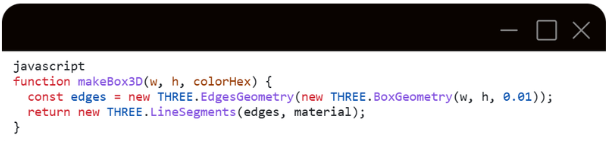
EdgesGeometry + LineSegments renders only the edges of a box — the effect of a thin wireframe border with no filled surface.
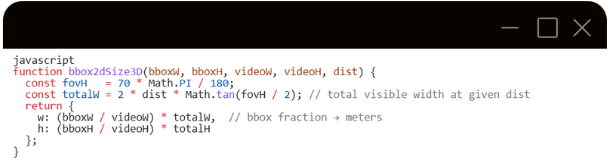
The totalW formula is standard perspective projection: at distance d, the visible width depends on the FOV. From this we derive how many meters correspond to the pixels of the bounding box.
6. runDetection() — AI Inference Pipeline (lines 205–247)
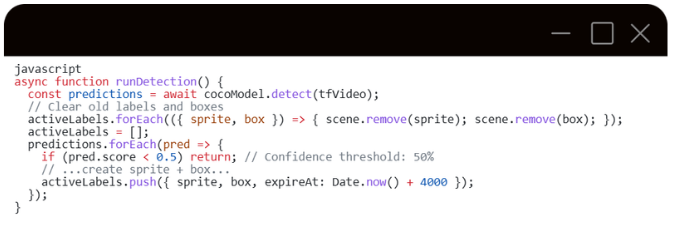
cocoModel.detect(tfVideo) accepts a <video> element directly — TF.js internally reads pixel data from the current video frame.
pred.bbox format: [x, y, width, height] in pixels.
Each detection creates a JS(sprite, box) pair that lives for 4 seconds.
7. WebXR Session — Key Details (lines 274–285)
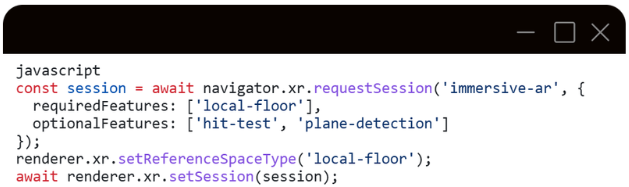
Why immersive-ar and not immersive-vr?
- immersive-vr = opaque black background (VR helmet experience)
- immersive-ar = passthrough camera + virtual content overlaid on top
local-floor reference space fixes the coordinate system to the room floor — y=0 is at floor level.
hit-test and plane-detection are optional because they are not supported on all devices and browser versions — declaring them as optional prevents the session from failing if they're unavailable
8. Render Loop (lines 335–395)
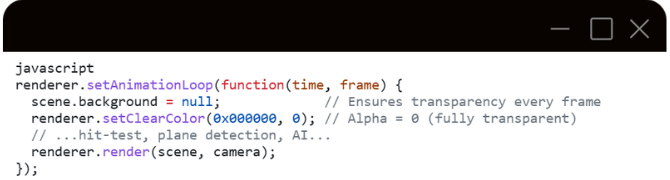
Why setAnimationLoop and not requestAnimationFrame?
The Three.js XR render loop must be integrated with the WebXR frame callback. renderer.setAnimationLoop() automatically binds to the XR session when renderer.xr.enabled = true. The alternative (manually calling session.requestAnimationFrame()) requires calling renderer.render() manually but risks missing the correct XR view matrices that Three.js applies internally.
scene.background = null must be called every frame because Three.js may reset this value internally during certain operations.
9. Plane Detection (lines 355–378)
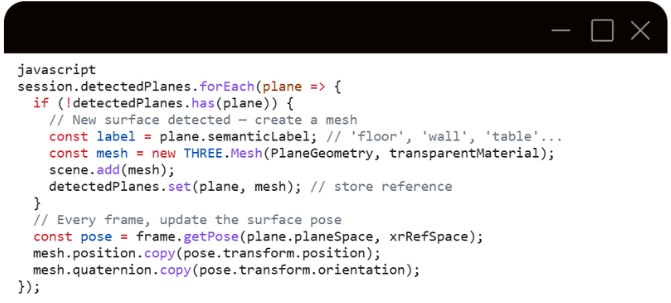
plane.planeSpace is an XRSpace that tracks the physical surface. frame.getPose() returns its pose in the chosen reference space.
The detectedPlanes map (Map<XRPlane, THREE.Mesh>) prevents creating duplicate meshes for the same surface across frames.
8.6 Known Limitations
|
Limitation |
Reason |
|
AI labels are not pixel-perfect aligned with object |
The Quest passthrough cameras and getUserMedia deliver different streams with different FOV and optical calibration |
|
Plane detection requires Quest Room Setup to be completed |
The headset must have previously scanned the room |
|
getUserMedia may be denied on some devices |
Depends on browser permissions |
|
AI inference is not real-time (runs every 2s) |
coco-ssd is a relatively heavy model; lighter alternatives (MobileNet SSD) would give higher throughput |
8.7 Source code
https://github.com/bciric1/ARVR
Last modified: Tuesday, 2 June 2026, 2:30 PM