5. Load Model and Drive Autonomously
Start your car with the model
cd ~/mycar
python manage.py drive --model ~/mycar/models/mypilot.h5
For autonomous driving or steering, use the web browser joystick on another device.
You will need to use a tablet or phone connected to the same wifi. After starting the car, use a tablet or phone to connect to the car's web server using the car's IP:8887. The car should display its IP if the OLED Display Service was enabled in a previous step.
Autonomous Driving
NOTE: As soon as Local Pilot is selected the car will start autonomous driving
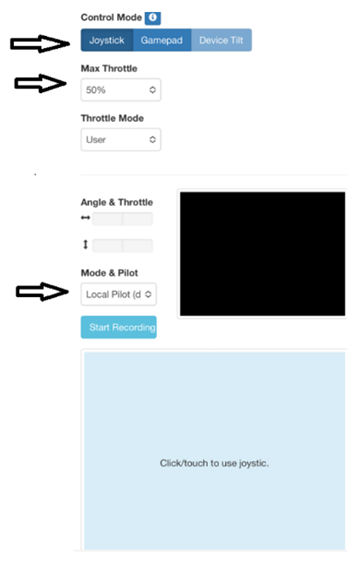
· Control Mode: Select **Joystick ** (the joystick control area is labeled click/touch to use joystic)
· Max Throttle: Set the Max throttle to about 50% to keep the car from going too fast
· Mode & Pilot: Select Local Pilot (Local Pilot is autonomous)
Autonomous Steering
· Control Mode: Select **Joystick ** (the joystick control area is labeled click/touch to use joystic)
· Max Throttle: Set the Max throttle to about 50% to keep the car from going too fast
· Mode & Pilot: Select Local Angle (Local Angle is the car steering while you provide the throttle)
Faster autonomous model?
Use your working autonomous driving model to gather new data at a faster speed. Use Local Angle so the car steers while you provide faster throttle.
Last modified: Tuesday, 2 June 2026, 2:28 PM