
COCO Dataset
Here's a simple Jupyter Notebook exercise for students using the COCO (Common Objects in Context) dataset. This exercise will help them get familiar with loading and visualizing images and annotations from the dataset.
Exercise: Exploring the COCO Dataset
Objective:
Load the COCO dataset.
Visualize images and their corresponding annotations.
Prerequisites:
Install the pycocotools library.
Download the COCO dataset (e.g., 2017 Train/Val images and annotations).
Step 1: Install Required Libraries
First, ensure you have the necessary libraries installed. You can install them using pip if you haven't already:
%pip install pycocotoolsStep 2: Import Libraries
import numpy as np
import matplotlib.pyplot as plt
from pycocotools.coco import COCO
import requests
from PIL import Image
from io import BytesIO
Step 3: Load the COCO Dataset
import os

# Path to the COCO annotations file
annFile_url = 'https://github.com/AIForVet/aiml/raw/refs/heads/main/annotations/instances_train2017.json'
annFile_local = 'instances_train2017.json'

# Download the annotations file if it does not exist
if not os.path.exists(annFile_local):
	response = requests.get(annFile_url)
	with open(annFile_local, 'wb') as f:
		f.write(response.content)

# Initialize COCO api for instance annotations
coco = COCO(annFile_local)
Step 4: Load and Display random Image
# Get image ids
imgIds = coco.getImgIds()

# Select a random image
img = coco.loadImgs(imgIds[np.random.randint(0, len(imgIds))])[0]

# Load and display the image
img_url = img['coco_url']
response = requests.get(img_url)
img_data = Image.open(BytesIO(response.content))
plt.imshow(img_data)
plt.axis('off')
plt.show()
Step 5: Load and Display Annotations
# Load and display annotations
annIds = coco.getAnnIds(imgIds=img['id'], iscrowd=False)
anns = coco.loadAnns(annIds)

# Display annotations
plt.imshow(img_data)
plt.axis('off')
coco.showAnns(anns)
# display text for annotations
for ann in anns:
    bbox = ann['bbox']
    plt.text(bbox[0], bbox[1], coco.loadCats(ann['category_id'])[0]['name'], color='red', fontsize=12, weight='bold')
plt.show()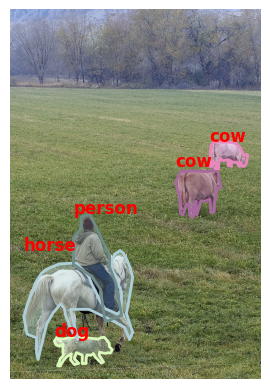
Instructions for Students
1. Follow the steps to install the required libraries and load the COCO dataset.
2. Modify the code to display multiple images and their annotations.
3. Explore different categories and visualize images belonging to specific categories.
Completion requirements:
- Make a submission