
Here's a simple Jupyter Notebook exercise for students to learn about model validation. This exercise will guide them through loading a dataset, training a model, and using cross-validation to evaluate its performance.
Exercise: Model Validation Using Cross-Validation
Objective:
Load a dataset.
Train a model.
Use cross-validation to evaluate the model's performance.
Prerequisites:
Install the scikit-learn library.
Use a simple dataset like the Iris dataset.
Step 1: Install Required Libraries:
%pip install scikit-learnStep 2: Import Libraries:
import numpy as np
import matplotlib.pyplot as plt
from sklearn import datasets
from sklearn.model_selection import train_test_split, cross_val_score
from sklearn.linear_model import LogisticRegression
Step 3: Load the Dataset:
# Load the Iris dataset
iris = datasets.load_iris()
X = iris.data
y = iris.target
Step 4: Split the Dataset:
# Split the dataset into training and testing sets
X_train, X_test, y_train, y_test = train_test_split(X, y, test_size=0.3, random_state=42)
Step 5: Train the Model:
# Initialize and train the logistic regression model
model = LogisticRegression(max_iter=200)
model.fit(X_train, y_train)
Step 6: Make Predictions:
# Perform cross-validation
scores = cross_val_score(model, X, y, cv=5)

print(f'Cross-Validation Scores: {scores}')
print(f'Mean Cross-Validation Score: {scores.mean()}')
Step 7: Visualize Cross-Validation Scores:
# Visualize the cross-validation scores
plt.figure(figsize=(10, 6))
plt.plot(range(1, len(scores) + 1), scores, marker='o', linestyle='--')
plt.title('Cross-Validation Scores')
plt.xlabel('Fold')
plt.ylabel('Accuracy')
plt.ylim(0, 1)
plt.grid(True)
plt.show()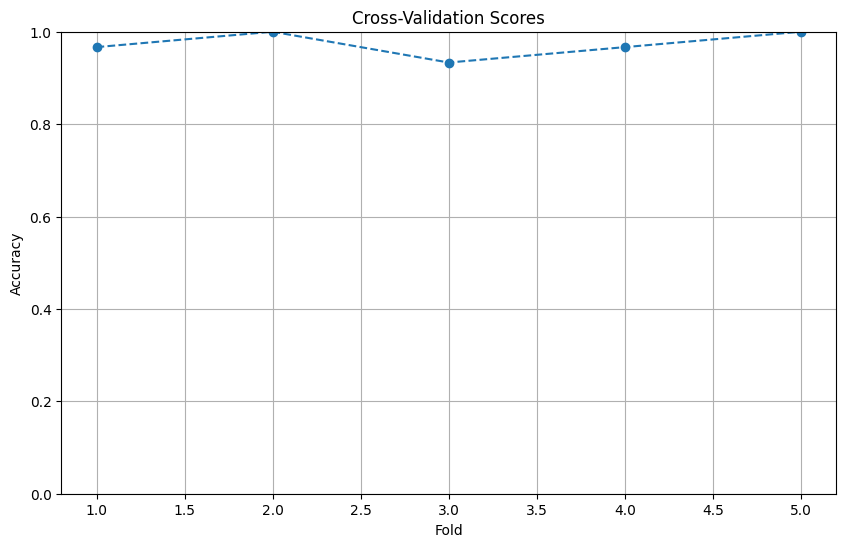
Instructions for Students:
1. Follow the steps to install the required libraries and load the dataset.
2. Train the logistic regression model and evaluate its performance using cross-validation.
3. Modify the code to use different models or datasets.
4. Explore the impact of different cross-validation strategies (e.g., different numbers of folds).
Completion requirements:
- Make a submission